Let’s use our list of object types and their parent-child relations to define the hierarchical structure. To fully demonstrate what metadata apps can do, we created a slightly more complicated structure for our example application.
Every application must be assigned an object hierarchy. Other applications usually need the default core#object. However, metadata apps often have a custom schema, which is why their hierarchy must be explicitly defined in the package.
Download the full examples we used in this tutorial to follow along: - Recipe Manager (version data ingestion): Recipe Manager (Metadata Application).json - SQL script with the example database: Recipe SQL Script.sql
Native and Hybrid Hierarchy
First, we need to take a look at hierarchy types. Metadata apps allow you to define at least two hierarchy types, one of which is mandatory.
| Hierarchy | Hierarchy Type | Purpose |
|---|---|---|
| Native (Mandatory) | Object | Native hierarchies define how the real database is structured and how the real objects are organized. It’s the hierarchy that is native to your database, which is why defining it is mandatory. |
| Default | Hybrid | Hybrid hierarchies build upon the native hierarchy (which is also why the native hierarchy is highly important and must be defined properly). Hybrid hierarchies simply display the objects from native hierarchies in a custom way. They can help you with better organization of your objects thanks to personalized categorization and can be set as the default. |
For more information on other hierarchy types, see Hierarchy definitions.
Define the native hierarchy carefully before proceeding. Once the application is installed, the native hierarchy cannot be changed without deleting and reinstalling the entire package.
While reinstalling is normal during the package configuration process, it can be time-consuming, especially if you’ve already added users, attributes, or other configurations, as all of these will be lost in the process.
Example: Recipe Manager Hierarchy
In the comparison diagram below of hierarchies we will define for our example application. You can see the full native hierarchy, and our custom hybrid hierarchy with folders marked in yellow.
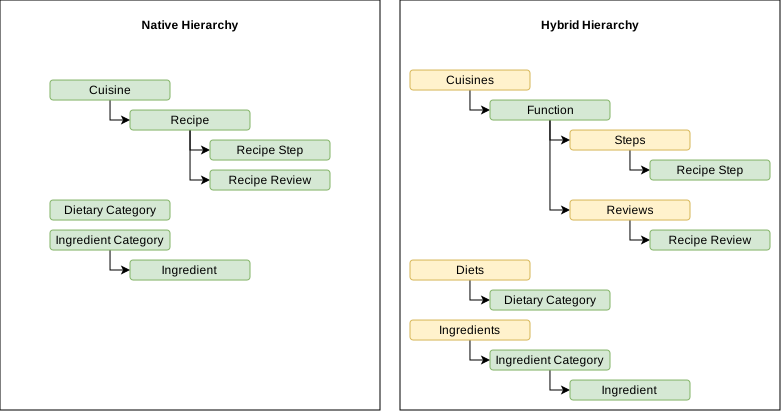
- Natively, the Recipe Manager has a Recipe object type with two types of child objects: Reviews andRecipe Steps.
- Problem: These would get organized alphabetically no matter its object type which can be chaotic.
- In the hybrid hierarchy, every Recipe will additionally have two foldersfor better clarity and organization of your data**:**
- Steps folder will contain all Recipe Steps objects.
- Reviews folder will contain all Review object types.
Similarly, having Dietary Categories, Cuisines, and Ingredients Categories all on the same level will just make the hierarchy extremely hard to navigate, which is why each object type will be in its own folder.
Defining a Hierarchy
A new hierarchy definition is created using this template:
"hierarchyDefinitions": [
    {
        "key": "native",
        "name": "Native",
        "description": "Native hierarchy reflecting your database.",
        "type": "object",
        "disableParentUpdate": false,
        "levels": [
            {
                "key": "native_",
                "name": "",
                "description": "",
                "type": "",
                "objectTypeKey": "",
                "hasFixedParent": false
            }
        ]
    },
    {
        "key": "default",
        "name": "Default",
        "description": "Hybrid hierarchy, used as the default view in Dawiso.",
        "type": "hybrid",
        "hasSameLevelParent": true,
        "levels": [
            {
                "key": "default_",
                "name": "",
                "description": "",
                "type": "",
                "objectTypeKey": "",
                "hasFixedParent": false
            }
        ]
    }
],| Property | Description |
|---|---|
key | Unique key of the hierarchy definition. It will be used to assign the hierarchy definition to an application. The convention is to have at least two hierarchy definitions, one native (reflecting real database structure) and default (used as the default view in Dawiso). |
name | Name of the hierarchy definition, displayed in the hierarchy selection dropdown (in the left navigation panel, click three dots, and select a definition). |
type | Type of the hierarchy definition. Supported values are:object: A native hierarchy definition is obligatory for a metadata app. It describes how objects are organized in the database., hybrid: A custom hierarchy definition. It works with the same objects that were ingested into the native definition but reorganizes them. |
levels | Individual levels of the hierarchy with each level being one object type. For more information, see the next section. |
Define Hierarchy Levels
Hierarchy levels specify where each object type is in the hierarchy and how they are or should be organized (for example, we must specify that Cuisine is the parent of Recipe).
We must define levels for all object types, including folders, otherwise they won’t be visible in Dawiso.
| Property | Description |
|---|---|
key | Unique key of the level. The convention is to start the key with native_ or default_. |
name | Name of the level. If the folder type is a folder, it will be displayed in the hierarchy in Dawiso. |
description | Description of the level, used mainly for internal purposes so that everyone knows the purpose of the property. |
hasFixedParent | Determines whether a child object can be moved to another parent object. Depends on the scanned source platform (e.g., file in folder should have a fixed parent, otherwise it can be moved to another folder). |
type | Type of the level. Supported values are:OBJ: Object type level., FLD: Folder type level. |
objectTypeKey | Key of the object type shown at this level. Used only when the level type is OBJ. |
parentLevelKey | Key of the parent level. |
template | Used mainly for folder-type levels as they don’t have a defined page unlike objects. We won’t go into details on how to configure it in this tutorial, for more information, see 5.B Configure Object Type Templates or refer to the package for example configuration. |
Hierarchies must be assigned to the application using the hierarchyDefinitions property. Make sure to designate one as the default.
"applications": [ { "key": "app", ... "hierarchyDefinitions": [ { "hierarchyDefinitionKey": "default", //Our hybrid hierarchy. "isDefault": true }, { "hierarchyDefinitionKey": "native", "isDefault": false } ], ... } ],
Example: Recipe Manager
Native Hierarchy
Let’s take a look at how we would define a native hierarchy for our example application. A native hierarchy describes the objects and their parents the way they are in your database. For example, if we have:
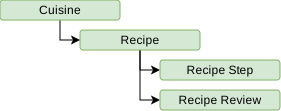
This hierarchy would be configured like the following. You can see that the Recipe level has a specified parent level.
"levels": [
    {
        "key": "native_objects_cuisine",
        "type": "OBJ",
        "objectTypeKey": "cuisine",
        ...
    },
    {
        "key": "native_objects_recipe",
        "parentLevelKey": "native_objects_cuisine",
        "type": "OBJ",
        "objectTypeKey": "recipe",
        ...
    },
    {
        "key": "native_objects_recipe_step",
        "parentLevelKey": "native_objects_recipe",
        "type": "OBJ",
        "objectTypeKey": "recipe_step",
        ...
    },
    {
        "key": "native_objects_recipe_review",
        "parentLevelKey": "native_objects_recipe",
        "type": "OBJ",
        "objectTypeKey": "recipe_review",
        ...
    },
],
Hybrid Hierarchies
Hybrid hierarchies allow you reorganize the objects the way you want, notably by adding folders.
For example, in our application, Recipe has two types of child objects: Recipe Steps and Recipe Reviews. In the native hierarchy, these are all on the same level and ordered alphabetically, which can be chaotic.
This is why we reorganized the object types into folders:
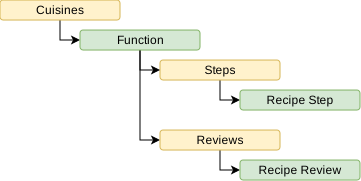
This hierarchy will be configured like this:
"levels": [
    {
        "key": "default_objects_fld_cuisine_category",
        "type": "FLD",
        ...
    },
    {
        "key": "default_objects_cuisine",
        "parentLevelKey": "default_objects_fld_cuisine_category",
        "type": "OBJ",
        "objectTypeKey": "cuisine",
        ...
    },
    {
        "key": "default_objects_recipe",
        "parentLevelKey": "default_objects_cuisine",
        "objectTypeKey": "recipe",
        ...
    },
    {
        "key": "default_objects_fld_step",
        "parentLevelKey": "default_objects_recipe",
        "type": "FLD",
        ...
    },
    {
        "key": "default_objects_recipe_step",
        "parentLevelKey": "default_objects_fld_step",
        "type": "OBJ",
        "objectTypeKey": "recipe_step",
        ...
    },
    {
        "key": "default_objects_fld_review",
        "parentLevelKey": "default_objects_recipe",
        "type": "FLD",
        "hasFixedParent": true,
        ...
    },
    {
        "key": "default_objects_recipe_review",
        "parentLevelKey": "default_objects_fld_review",
        "type": "OBJ",
        "objectTypeKey": "recipe_review",
        ...
    },
    ...
],