With everything has been created, we can finalize our application. If you followed the optional step from Start with a Blank Package article, some of this content will already be familiar.
As usual, there are many properties you can define in this asset. Let’s start with a blank template containing the essential properties of an applications asset.
While you can technically define multiple applications in one package, we highly advise against doing so due to:
- Maintenance Complexity: Managing updates and changes becomes significantly harder when multiple applications share the same package.
- Reusability: Keeping applications in separate packages allows for better modularity and reusability across different environments.
- Dependency Management: Independent application packages make it easier to track dependencies and avoid conflicts between configurations. For better organization and long-term scalability, define each application in its own package.
"applications": [
    {
        "key": "app",
        "name": "",
        "shortcut": "",
        "description": "",
        "colorKey": "",
        "defaultObjectTypeKey": "app_overview",
        "objectTypeKeys": [ ],
        "hierarchyDefinitions": [ ],
        "search": [ ],
        "settings": [ ]
        "templates": { }
    }
],
In the screenshot below, you can see which UI components some of the properties configure.
For the full list of available properties, see the article on Applications.
These basic properties can be divided into the following categories:
- Basic Application Details: Fundamental application identifiers. Same as the optional step from Start with a Blank Package article.
- Object Types Management: Properties assigning object types to the application.
- Application Configuration: Properties configuring general settings of the application.
- Application Layout: Properties defining the visual appearance of the application’s overview page.
Basic Application Details
| Property | Purpose | Recipe Manager Example |
|---|---|---|
key | A unique identifier for your application, used for referencing in other apps. A short, simple name like app is enough, as the full identifier will automatically include the package key (e.g., cust_recipe_manager_app). | "key": "app", |
name | The display name for your app in Dawiso’s UI. | "name": "Recipe Manager (Tutorial app)" |
shortcut | An abbreviation shown in the UI when no custom icon is provided. You can use up to three letters. | "shortcut": "RM", |
description | (Optional) A brief explanation of your app, useful for documentation or UI tooltips. | "description": "An application for managing recipes and their ingredients." |
Object Types Management
| Property | Purpose | Recipe Manager Example |
|---|---|---|
defaultObjectTypeKey | Specifies the page (object type) used as an application overview in the space (space app view). | "defaultObjectTypeKey": "app_overview", |
objectTypeKeys | Specifies all object types that belong to the application. This will allow us to select these types when creating a new object in this app. | "objectTypeKeys": [ "cuisine", "recipe", "ingredient_category", "ingredient" ], |
Application Configuration
| Property | Purpose | Recipe Manager Example |
|---|---|---|
colorKey | Links to a color defined under Settings > Configurations > Colors or in the colors asset. | "colorKey": "recipe_app_color", |
hierarchyDefinitions | Defines how object types are displayed in the left-side navigation. For business applications, this property should always be set to core#object. Regardless of the number of hierarchy definitions, one must always be marked as the default. Custom hierarchy definitions are required mainly for data ingestion applications. | "hierarchyDefinitions": [ { "hierarchyDefinitionKey": "core_object", "isDefault": true } ], |
search | Specifies default search settings for the application. In our example, setting isSearchable at the application level ensures that all objects within this application will appear in search results. | "search": [ { "isSearchable": true } ], |
settings | Specifies default application settings such as import/export, tokenization, etc. In our example, we made sure to enable Excel object export and import. See the full list of configurable settings. | "settings": [ { "key": "excel_export_enabled", "value": true }, { "key": "excel_import_enabled", "value": true } ], |
We recommend using predefined colors from Settings > Configuration > Colors to ensure uniformity in display. Custom colors may be subject to changes during redesigns or upgrades, which could affect the consistency of your UI.
However, if you are using a custom color, make sure to define it in the colors asset.
"colors": [ { "key": "", "name": "", "colorHex": "" } ],
Some application settings will become immediately visible in the UI. In the screenshot below, you will find the enabled object import and export.
Application Overview Layout
| Property | Purpose |
|---|---|
templates | Configures the application overview page using components and attributes. |
| The application overview is accessible by clicking the application name in the Applications tab of the top navigation bar. It aggregates data across all spaces where the app is installed, making it particularly useful for cross-space insights and management. |
Do not confuse application overview pages with:
- Object Type Templates: Define the layout and structure for individual object types.
- The Space Application Overview is an object type set as the default for the application, but it serves as an overview of the app within a single space.Page Templates (Dashboards): These are designed for reporting and data visualization and are often managed in a separate package for better organization.
Configure the application overview in the templates property of the applications asset. A basic configuration looks like this, where components are added to the center and right areas:
"templates": {
    "main": {
        "centerArea": [
            {
                "type": ""
            }
        ]
        /* "rightArea": [
            {
                "type": "component"
            }
        ]*/
    }
},You can define the center and right areas to structure your templates, which we used for our object types. For our application overview, we will use a splitter component, which divides the center area into multiple sections. Using a splitter, you can create up to three columns on your page, offering flexibility in layout design.
"templates": { "main": { "centerArea": [ { "type": "splitter", "sections": [ { "width": "xx%", "values": [/* components */] } ] } ] } },
Advanced configurations, such as integrating charts, graphs, or additional components, will be covered in future tutorials.
Example: Recipe Manager Basic Application Overview
In the screenshot below, you can see an example of an application overview configuration.
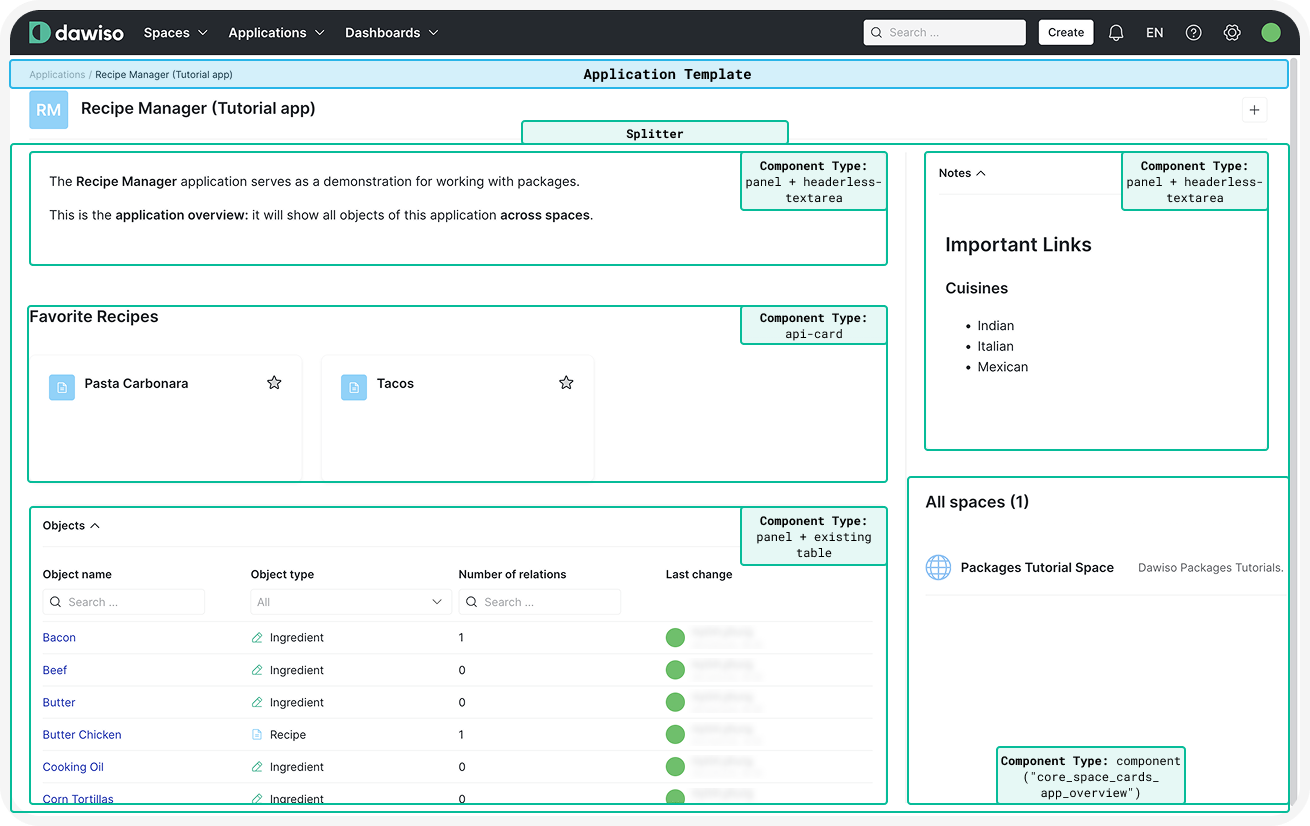 Click here to hide the example.In our Recipe Manager app, we want an application overview listing all recipes across spaces:
Below is a detailed example of an application overview layout for the Recipe Manager application. This dashboard displays uses some special components such as:
- Headerless text areas: Rich text editors without headers.
- With raw value text: Used for displaying text or other attributes on pages.API cards: Creates cards that serve as easy navigation to apps, spaces, or objects.Panel: Wraps multiple components in the same box.
| Component | Example |
|---|---|
| A description area for the application. | { "type": "panel", "values": [ { "type": "headerless-textarea", "key": "description", "componentId": "raw-value#description" } ] }, |
| A favorites section for quick access to preferred recipes. | { "type": "api-card", "api": "api/dashboard/favourites", "nameAttribute": "Favourites", "headerTitle": "title.favoriteRecipes", "layouts": [ { "type": "cards" } ], "favouriteObjectTypes": [ { "key": "recipe" } ], "filter": { "applicationID": { "value": "@appId" } } }, |
| A table of all objects associated with the app with: object name, object type, number of relations, last change date. | { "type": "panel", "title": "title.application_template.api-table.objects", "componentId": "panel#api-table-panel", "values": [ { "componentId": "api-table#application-objects", "type": "api-table", "tableId": "tableObjects", "filter": { "applicationId": { "value": "@appId" } }, "columns": [ { "type": "definedKey", "value": "objectName" }, { "type": "definedKey", "value": "objectTypeName" }, { "type": "definedKey", "value": "numberOfRelations" }, { "type": "definedKey", "value": "lastChange" } ] } ] } |
| A text area for notes. | { "type": "panel", "title": "title.dashboardNotes", "values": [ { "type": "headerless-textarea", "key": "notes", "componentId": "raw-value#notes" } ] }, |
| Overview of spaces the application is installed in. | { "type": "component", "value": "core_space_cards_app_overview" } |
Example: Recipe Manager’s applications Asset
/api/mr-object-data/1024/file/df29faac-a320-94e4-b1db-010e48ee6e03/binary Download the full example Recipe Manager application package here: Recipe Manager (Tutorial App).json
Click here to hide the example.
”applications”: [
{
“key”: “app”,
“name”: “Recipe Manager (Tutorial app)”,
“shortcut”: “RM”,
“description”: “An application for managing recipes and their ingredients.”,
“colorKey”: “core_app_light_blue”,
“defaultObjectTypeKey”: “app_overview”,
“objectTypeKeys”: [
“cuisine”,
“recipe”,
“ingredient_category”,
“ingredient”
],
“hierarchyDefinitions”: [
{
“hierarchyDefinitionKey”: “core_object”,
“isDefault”: true
}
],
“search”: [
{
“isSearchable”: true
}
],
“settings”: [
{
“key”: “excel_export_enabled”,
“value”: true
},
{
“key”: “excel_import_enabled”,
“value”: true
}
],
“templates”: {
“main”: {
“centerArea”: [
{
“type”: “panel”,
“values”: [
{
“type”: “headerless-textarea”,
“key”: “description”,
“componentId”: “raw-value#description”
}
                },
                {
                    "type": "api-card",
                    "api": "api/dashboard/favourites",
                    "nameAttribute": "Favourites",
                    "headerTitle": "title.favoriteRecipes",
                    "layouts": [
                        {
                            "type": "cards"
                        }
                    ],
                    "favouriteObjectTypes": [
                        {
                            "key": "recipe"
                        }
                    ],
                    "filter": {
                        "applicationID": {
                            "value": "@appId"
                        }
                    }
                },
                {
                    "type": "panel",
                    "title": "title.application_template.api-table.objects",
                    "componentId": "panel#api-table-panel",
                    "values": [
                        {
                            "componentId": "api-table#application-objects",
                            "type": "api-table",
                            "tableId": "tableObjects",
                            "filter": {
                                "applicationId": {
                                    "value": "@appId"
                                }
                            },
                            "columns": [
                                {
                                    "type": "definedKey",
                                    "value": "objectName"
                                },
                                {
                                    "type": "definedKey",
                                    "value": "objectTypeName"
                                },
                                {
                                    "type": "definedKey",
                                    "value": "numberOfRelations"
                                },
                                {
                                    "type": "definedKey",
                                    "value": "lastChange"
                                }

                        }

                }
            ],
            "rightArea": [
                {
                    "type": "panel",
                    "title": "title.dashboardNotes",
                    "values": [
                        {
                            "type": "headerless-textarea",
                            "key": "notes",
                            "componentId": "raw-value#notes"
                        }

                },
                {
                    "type": "component",
                    "value": "core_space_cards_app_overview"
                }

        }
    }
}
],