December, 2024
We’re excited to present you with the Long-Term Support (LTS) Release Note 2024.11! This LTS covers all Dawiso updates, enhancements, and bug fixes released since release 2024.6. Our ongoing commitment to improving the platform ensures you have access to the most reliable and feature-rich tools. In this document, you will find a detailed overview of what’s new.
Please note that this LTS serves as a full replacement for a standard release note.
Download the 2024.11 LTS as a PDF here.
AI-Powered Features
AI-Generated Domains
In this LTS, we introduced the ability to automatically create domains using AI.
Our AI identifies potential domain candidates by analyzing frequently recurring attributes (columns) across your datasets. Once a domain candidate is selected and created, the system generates categories, domains, and descriptions, which are then distributed to matching columns across your databases.
This feature simplifies and accelerates data organization by providing an initial categorization during your first database scan. The AI suggestions can be accepted, refined, or adjusted, saving significant time and effort when beginning the documentation process.
By applying generated descriptions to all columns or fields with the same name, it also automatically ensures consistency across datasets, which reduces errors and supports reliable data governance.
ChatGPT via Proxy
We also added support for ChatGPT via a proxy.
This allows on-premises configurations to securely access external resources or the internet through a proxy server within your local network.
This feature ensures seamless integration of AI tools while maintaining the security and flexibility required for your environment.
API Cards
Display Additional Information
API cards can be configured using packages to include previews of attributes, user relations, and other related data. This makes it easier to access essential details directly from your dashboard.
New Layout Option
A detailed list view has been added as a new layout option for your homepage. Alongside the traditional grid layout, this option provides greater flexibility in organizing and displaying your API cards.
Original grid layout:
New table layout:
API Tables
Action Buttons
Action buttons were introduced to enhance the functionality of API tables. These buttons can be configured with actions specified by custom queries, such as opening third-party websites directly from the table.
API Table with Comments
A new API table type was added to consolidate all comments within a space, offering a centralized view for easier management. This feature enables you to filter and search comments by:
- Authors
- Strings or keywords
- User mentions and more
Custom API Tables
Custom API tables are no longer tightly coupled with embedded procedures but are now managed using statements. This enhances system usability, supports more modular and accessible integration, and enables us and our partners to perform tailor-made adjustments to meet specific requirements.
Optimizations
Significant optimizations to API tables have been made to improve usability and user experience:
- Column Width:
- Minimum column width was introduced to enhance readability.
- API table columns also dynamically adjust to fit content, with longer text displaying up to a defined maximum for clarity.
- Hover Details: Hovering over records reveals the exact count.
- Icons: Icons have been optimized to enhance visual consistency and usability. This includes the harmonization of object type icons for a more unified appearance and the addition of workflow status icons for improved clarity and quick identification of statuses.
Conditional Attribute Selection
Conditional Codetable Label Selection
We introduced a feature that enables the selection of codetable labels based on shared relations with a third object. For example:
If you have a Product, a Domain, and a Column with the following relations:
- Product → Domain
- Domain → Column
When selecting labels for Product or Column, only codetable labels shared between Domain and Column will be available for selection.
For example, if you have a list of products, selecting Product Type A will allow you to choose only specific products that belong to Product Type A’s category. This ensures more precise and context-relevant label assignment, improving data consistency and accuracy.
Conditional Relation Selection
Conditional relation selection was introduced to simplify creating relationships between objects based on shared relations with a third object.
For example:
If you have a Product, a Domain, and a Column with the following relations:
- Product → Domain
- Domain → Column
When adding a relation for Product → Column, only relations shared between Domain and Column will be selectable, as Domain acts as the common link.
Dashboard Charts and Graphs
Chart Enhancements
Previously, charts were built using a REST API over C#. Now, they are implemented using a REST API over pre-saved (predefined) statements. This shift from C
to pre-saved statements marks a significant technical advancement, simplifying the implementation process and allowing us and our partners to perform tailor-made adjustments.
Charts Customization Levels
A wider variety of graph types with two main customization levels:
- Data Configuration: Graphs can be tailored by selecting data types via API statistics tables or the database API.
- Graph Definition: Chart customization was significantly expanded with the integration of Chart.js. Beyond the traditional column, pie, and line charts, users can create advanced visualizations such as area line charts, radar charts, and others, offering flexible customization in terms of colors, shapes, and styles.
Multi-Dataset Comparisons
It is now possible to include multiple datasets in a single graph, enabling comparative insights. For instance, you can visualize viewers and contributors over time, enhancing the depth of your data analysis.
Global Time Selector
A global time selector was introduced, allowing for consistent date range application across the entire dashboard. This includes word clouds, which previously relied on independent time selectors. This enhancement simplifies and unifies time-based filtering, providing a seamless user experience.
Summaries Cards
Cards with summaries (e.g., for KPIs) on dashboards are fully customizable. You can add visualizations showing the number of objects, users, or spaces, as well as graphs reflecting object status.
For example, using summary cards, you can create indicators to showcase key statistics. These cards allow you to display key metrics, such as the number of business domains, most visited apps, or active users. Additionally, they support percentage comparisons with the previous period, offering a clearer overview of your data trends.
Data Lineages and Diagrams
Customization and Editing
- Add Labels: Up to three labels (e.g. data stewards), can be displayed alongside columns or in higher-level objects, offering enhanced contextual detail.
- Infobox: The right-click menu now includes actions accompanied by corresponding explanations, providing intuitive guidance for users.
- Undo and Redo Features: Convenient commands Ctrl+Z and Ctrl+Y (or Cmd+Z and Cmd+Y) were added to reverse and return manually added elements, offering greater flexibility in managing changes.
- Improved Modal UI: The modal interface for selecting child objects and relations has been optimized for better clarity and ease of use.
Navigation and Interaction
- Main Object Highlight: Selected objects are highlighted by default when opened in a new tab or window, improving visibility and navigation.
- Improved Scrolling: The scrolling experience has been enhanced for selecting child objects in data lineages, ensuring smoother navigation in complex diagrams.
- Fullscreen Mode: Diagrams automatically open in fullscreen mode after actions such as double-clicking an object or rolling out object details.
- Adding Objects in Editors: When looking up objects to add in text editors and diagrams, the object search now displays full object names and paths. This enhances reference clarity and simplifies the identification of objects.
Visual Enhancements
- Unified Icons: Consistent icons are displayed in both diagram and hierarchy views for a cohesive visual experience.
- Data Type Icons at the Column Level: Icons indicating data types have been added to diagrams, enabling easier identification of errors and streamlining visual troubleshooting.
- Path Simplification: A Show All Paths toggle was added to allow a clearer focus on the selected object and its direct object paths.
Export & Import Function
Export from Space Overview/Dashboard
Admins can newly add an Object Export button to space overviews and dashboards via packages, making it easier to export object lists directly from these pages. When not configured, this export is only accessible through the Explorer on app and object pages.
Word exports
- Export Templates: It is now necessary to assign Word export templates to specific apps for them to be selectable. This configuration ensures compatibility and streamlines the export process by showing only relevant templates.
- Template Management: Word templates can be added to an app directly via the UI under Settings > Configuration, providing greater flexibility in managing templates.
Excel Exports
- Improved Date-Time Fields: Date-time fields in Excel exports have been refined. Previously, if only the date was specified, the time defaulted to 01:00. Now, only the date is exported for greater accuracy.
- Form Configuration: When creating a new export form, you will have the option to disable the export of hidden (static) attributes without any additional value, offering enhanced customization for your exports.
Ingestion
Improved Scanners
- Power BI: The performance of the Power BI connector has been enhanced, ensuring smoother operation and greater efficiency.
- Keboola: A new endpoint for lineage download has been added, further improving compatibility with Keboola.
New Scanners
- Confluent Kafka
- Google BigQuery (GBQ)
- SAP HANA
Ingest Button
A data Ingest button has been added to the app and space overview pages. This new feature simplifies the ingestion process by allowing users to initiate data ingestion directly from these pages, streamlining workflows and improving accessibility.
Ingestion packages
Ingestion apps can now be added through packages, offering enhanced flexibility. This also allows you to select specific attributes to be ingested based on the chosen technology, providing precise control over your ingestion processes.
Writeback Functionality
Our new writeback integration simplifies transferring Dawiso data into Tableau. Key features include:
- Extracting attribute values, such as column descriptions.
- Mapping data to specific Tableau sites, tables, or columns using IDs and object types.
- Scheduling regular writeback operations to ensure data stays synchronized with Dawiso after ingestion or attribute updates.
Keywords Attribute
A Keywords attribute was introduced to enhance object metadata.
When words or phrases separated by commas are typed into the component, they are tokenized into a list of mentions. This functionality mirrors the behavior of business glossary objects, improving discoverability and facilitating better categorization of data.
Knowledge Graph
The addition of knowledge graphs brings advanced object mapping to Dawiso, enabling you to view complex relationships between objects, roles, and spaces in a visually intuitive format.
Serving as a replacement for the previous relations diagrams, knowledge graphs enhance navigation and precision. They include filtering options by asset types and spaces, which will allow for more tailored and efficient exploration of connections within your data ecosystem.
Object Type Pages
Two significant updates have been introduced to the object header.
Action Buttons for External Links
If an object includes an external link as an attribute, this link can now be added as an action button to the object header. This button is also visible in object detail previews when using the advanced search, providing quick access to external resources.
Optimized Scrolling with a Pinned Header
Scrolling has been refined to ensure that a compact version of the header remains pinned. This pinned header displays essential actions and information, including workflow state, favorite actions, and Jira ticket links, keeping key functionalities accessible at all times. 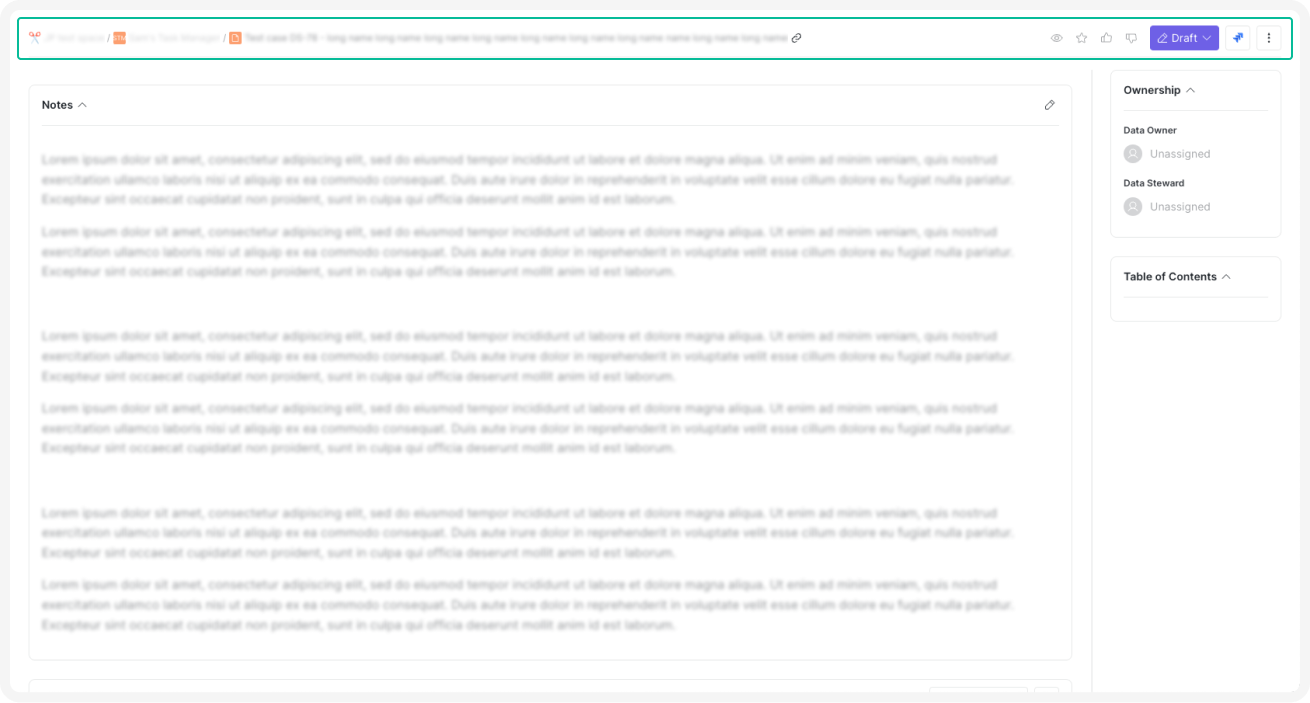
Packages
This update brings several improvements and new configuration possibilities to packages:
- Comments in Anonymous Concepts: Commenting can now also be allowed under anonymous concepts. Previously, commenting on concepts created as the initial stage for new objects was not possible, which posed challenges for approval workflows.
- Default User Role Assignment to Creator: Applications can be configured to automatically assign a specific user role (e.g., data owner) to the user who creates an object, simplifying role management.
- Object Numbering: Admins and space admins have the option to enable or disable default numbering for objects within an application, offering greater flexibility in object organization.
- Package Validation: Clearer and more detailed messages are displayed during package validation. In cases of errors, the messages provide enhanced transparency and guidance for troubleshooting.
Platform Settings
A Start Sync button has been added to the platform Configuration page, making it easier to synchronize marketplace packages. This ensures you always have access to the latest applications and updates with just a single click.
Synonyms in Search
Synonyms have been added to the Search function. If an object has a synonym child object, searching for the synonym will now also return the parent object, making searches more flexible and intuitive.
Text Editor
Customizable Default Font
Customizable default fonts have been implemented for text editors, providing greater flexibility in tailoring the platform to your preferences or organizational standards.
The following fonts are now supported:
- Andale Mono, Times
- Arial, Helvetica, Sans-Serif
- Arial Black, Avant Garde
- Book Antiqua, Palatino
- Comic Sans MS, Sans-Serif
- Courier New, Courier
- Georgia, Palatino
- Helvetica
- Impact, Chicago
- Inter
- Roboto
- Symbol
- Tahoma, Arial, Helvetica, Sans-Serif
- Terminal, Monaco
- Times New Roman, Times
- Trebuchet MS, Geneva
- Verdana, Geneva
- Webdings
- Wingdings, Zapf Dingbats
This allows you to configure text editors with a default font that best fits your needs, enhancing consistency and readability across your documents.
Enhanced Templates and Content Management
To streamline workflows and improve content consistency, new features have been introduced to enhance template usage and simplify the handling of text within editors.
- Templates: Customized HTML-rich default text can be preconfigured for text fields using packages. This feature enables text editors to automatically populate fields with predefined content, streamlining the creation of templates and standardized inputs.
- Simplified Copy-Paste Formatting: When pasting content from other editors, only basic formatting is retained. By filtering out complex HTML tags and preserving simple ones, pasted text displays correctly in Word or other compatible editors.
User Interface Improvements
A command legend has been added at the bottom of the text editor. This easy-to-reference guide enhances usability by making key functions readily accessible.
Object Search
Object search in text editors and diagrams has been improved to display full object names and paths. This update enhances reference clarity, simplifying the identification and navigation of objects within your environment.
Workflow Optimization
Approval and Transparency
- Draft Approval Request: A new Send to Approval button has been introduced for users who lack permissions to apply concepts. This allows them to request approvals efficiently without compromising the workflow.
- Workflow Transparency: Detailed lists of contributors, users at different workflow stages, and approvers are visible as workflow status details. This feature enhances visibility and accountability across the workflow.
Attachments Controls
Permissions for attachments can now be tied directly to the workflow state using packages. For example, unless an object is in the Edit state, no user (except for admins and space admins) can add or remove attachments. This ensures that attachments are managed securely and appropriately.
Workflow Diagrams
- Package-Based Workflow Diagrams: Workflow diagrams must be added via packages. These images, like icons, are stored as Base64 on the backend, ensuring consistency and security.
- Zoom and Scroll Support: Workflow diagrams feature zoom and scroll functionality, making it easier to navigate and view even the most complex workflows.
UX/UI Optimizations
We are dedicated to continuously enhancing the user experience on our platform. Updates in this release include:
Button Styling
Secondary buttons have been restyled to improve visual guidance, offering a more intuitive and consistent user experience.
Display Preferences
Display options such as card and table views were made available on the Favorites page and other table views. Your selected display settings will be retained across sessions, ensuring a personalized and consistent experience.
Homepage Simplification
To create a cleaner and less cluttered view, the homepage will hide tabs when only one is present, simplifying the interface.
Infinite Scrolling
Infinite scrolling has been implemented for adding users and codetable labels, enabling smoother navigation through large lists or labels or users without interruptions.
User Identification
Emails are now displayed alongside usernames, making it easier to identify users. Additionally, the platform supports searching for users by email, streamlining the process of locating individuals.
Conclusion
Thank you for your continued trust and invaluable feedback. This LTS release reflects our ongoing commitment to enhancing the Dawiso platform with features and optimizations that meet your evolving needs. Your insights drive our innovations, allowing us to create a platform that truly empowers your data governance journey.
We’re excited to continue this partnership by delivering tools that simplify complex workflows, improving collaboration, and unlocking new possibilities for your data management efforts. Together, let’s navigate the future of data governance with confidence and success!