September, 2024
We’re thrilled to introduce Dawiso 2024.7+8! 🚀 This release brings a number of improvements and new features tailored to elevate your user experience and make your workflows even more efficient.
Dive in to discover the updates and learn how they can enhance your productivity.
New Features
AI-Generated Domains
You can now automatically create domains using AI.
Based on frequently appearing attributes across tables, our AI will nominate potential domain candidates. Once you select a domain candidate and click Create Domain, our AI creates categories, domains, as well as descriptions, which are distributed to matching columns across databases.
Scanners and Ingestions
- Google BigQuery (GBQ): New GBQ scanner added.
- Keboola: New endpoint for lineage download added, improving Keboola compatibility.
- Ingest button: Data ingest button added to the app and space overview pages.
Enhancements
Diagrams
-
Unified icons: Consistent icons are displayed in both diagram and hierarchy views.
-
Data types icon at the column level: Data type icons are added to diagrams, allowing e.g., for easier identification of errors.
-
Add labels: Up to 3 labels, such as data stewards, can be made visible next to columns or in higher-level diagrams.
-
Lineage navigation: Selected objects will be highlighted by default when opened in a new tab or window.
-
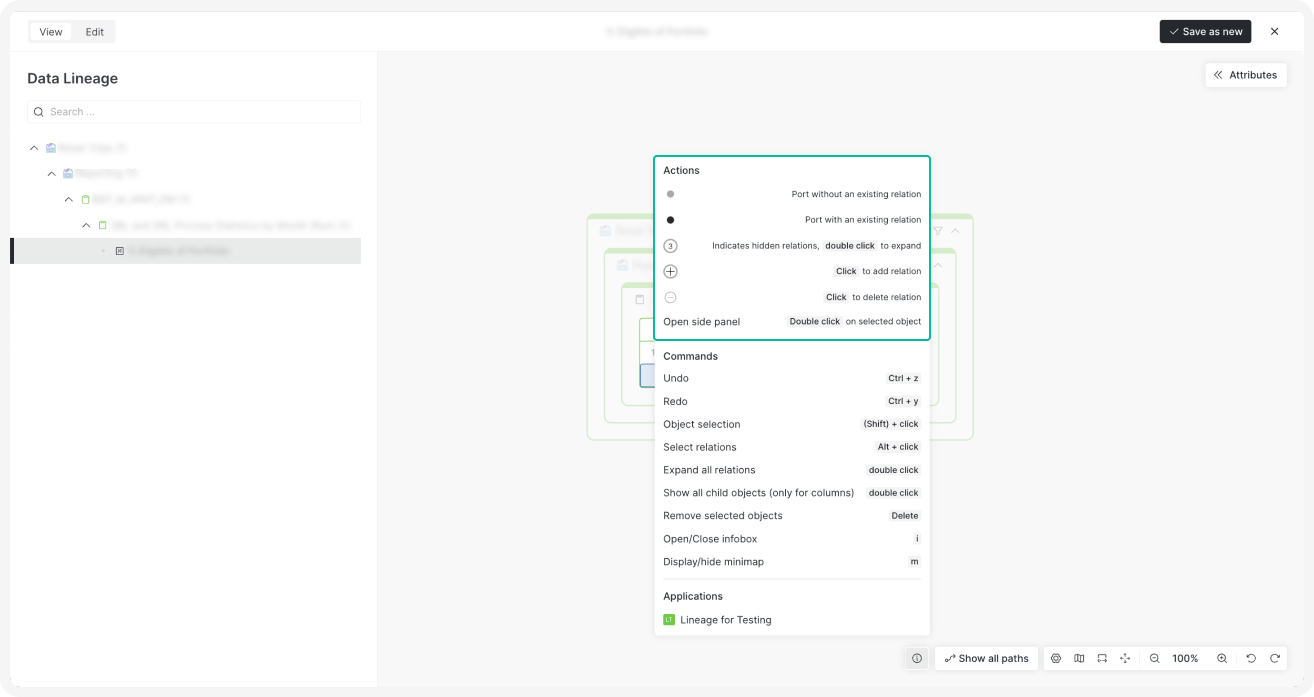
Infobox: The right-click menu displays actions with corresponding explanations.
-
Improved modal UI: The experience for selecting child objects and relations has been optimized.
Workflow Enhancements
- Draft approval: A new Send to approval button was added for users without permission to apply concepts.
- Workflow transparency: View lists of contributors, users at different workflow stages, and approvers for greater transparency.
Configuration Updates
Export Improvements
When creating a new export form, you can disable the export of hidden (static) attributes that don’t add any additional value.
Keywords Attribute
A new attribute named Keywords can be added to objects.
When words or phrases (separated by commas) are entered, they will be tokenized, creating a list of mentions, similar to business glossary objects.
Relation Selection
Create relations between two objects based on shared relations with a third object.
For example, we have a product, a domain, and a column with the following relations:
- Product —> Domain
- Domain —> Column
Now, we want to add a relation for Product —> Column. In this case, only relations that exist between Domain and Column will be selectable, as Domain is the common link.
Package-Based Workflow Diagrams
Workflow diagrams can now only be added via packages. Similar to icons, the images will be stored as Base64 on the backend.
Package Validation
Clearer, more detailed messages will now be displayed during package validation, especially if there is an error in the package, to enhance transparency.
Simplified Formatting of Copy-Pasted Text
Only basic formatting will be preserved when copying text from other editors.
By filtering out complex HTML tags and retaining only simple ones, the text will display correctly when pasted into Word or other editors.
UX/UI Improvements
- Column view: Minimum column width has been added to improve readability.
- Backslash command legend: A command legend has been added at the bottom of the editor for easy reference.
- User identification: Emails are now displayed alongside usernames for easier identification, with the ability to search a user by email.
- Infinite scroll: Infinite scroll has been applied to labels and user lists for smoother navigation.
- API tables: Hover to see the exact number of records; workflow status icons have been added.
- Word templates: Word templates can now be added direcly via the UI under Settings > Configuration.