December, 2025
We are pleased to introduce this version’s Long-Term Support (LTS) Release Note 2025.11, which provides a consolidated view of all platform updates delivered since release 2025.5. It includes new features, architectural enhancements, UI improvements, and resolved issues accumulated throughout the past development cycle.
We continue to refine Dawiso to offer a dependable and scalable environment for metadata management and governance.
Please note that this LTS serves as a full replacement for a standard release note.
Download the 2025.11 LTS as a PDF here/api/mr-object-data/1847/file/352bae95-8d0b-4451-de54-6fd047af85b0/binary/api/mr-object-data/1847/file/6321950b-ff7a-cfaa-5375-729028a96cb2/binary/api/mr-object-data/1847/file/352bae95-8d0b-4451-de54-6fd047af85b0/binary.
AI & LLM Support
As AI capabilities continue to advance, we are committed to adopting modern technologies in a secure, governed, and practical way. Our approach has always been to introduce AI features that strengthen metadata quality, streamline work, and remain fully accountable within established governance processes. In this LTS, we build on our earlier AI enhancements with two major additions, most notably Model Context Protocol (MCP) support, which opens a new chapter for how Dawiso can interact with AI systems.
AI-Generated Metadata Descriptions
Automatically generated descriptions can now be created during metadata ingestion, helping teams enrich new assets with meaningful context from the start. Prompts are defined in packages and may pull additional information from the object through the template engine. Each attribute type can also have its own prompt, allowing outputs to reflect domain-specific conventions.
AI-generated text is clearly marked with a banner until manually reviewed and saved, ensuring transparency and control throughout the documentation process.
Model Context Protocol (MCP)
Dawiso now takes a significant step forward in connecting governance with modern AI ecosystems through early-adopter support for the Model Context Protocol (MCP). MCP is an open standard for exchanging context between applications and AI or LLM tools, enabling Dawiso to expose governed metadata and controlled actions to compatible AI clients through a defined set of endpoints. Dawiso MCP is also available via the Databricks MCP Marketplace, providing a straightforward way to deploy and manage the integration in Databricks environments.
With MCP connections, organizations can:
- Bulk create objects in Dawiso for faster onboarding and initial catalog setup.
- Automate workflow updates, including mass transitions and state changes.
- Provide AI tools with Dawiso metadata, allowing them to generate answers grounded in your internal, governed information.
- …and many other advanced orchestration scenarios.
This integration significantly expands how Dawiso can be used alongside modern AI platforms, pairing the flexibility of intelligent automation with trusted metadata foundations. Details regarding pricing and broader availability will be shared soon.First Endpoints Now Available
You can now connect Dawiso to MCP-compatible AI tools to retrieve information and execute governed actions directly from your AI workflows.
First Endpoints Now Available
MCP-compatible AI tools can already connect to Dawiso to retrieve context and execute governed actions. Using MCP, you can:
- Retrieve context for answers: Provide AI tools with accurate and approved information to enhance response quality.
- Carry out commands: Trigger mass status updates, create or modify assets, or push workflow transitions.
For setup information, available scopes, and examples, see the Dawiso Model Context Protocol (MCP) documentation.
Automation
We continuously develop automation rules to support a wider range of governance scenarios, helping teams reduce manual effort and maintain consistency across their metadata. The latest release expands triggers, stream filters, and available actions, giving administrators more control over how processes run behind the scenes.
Triggers
New automation triggers are now available, enabling more precise reactions to changes across the platform:
- Object renamed
- Concept published
- Object copied or cloned
- Workflow state changes, including conditions based on user roles and the required number of approvers
These additions allow workflows to respond more intelligently to updates and ensure that downstream processes stay aligned.
Streams
We also expanded the stream types that add more options for filtering objects that allow more precise selection of objects that the automation will apply to:
attributeComparatorFilter: This filter compares attribute values using expressions, making it possible to target only those objects whose attributes meet (or deviate from) specific conditions.workflowTransitionStateFilter: This filter selects objects based on transitions between defined workflow states and the number or percentage of users who approved the change. For example, you can act only on objects that moved from Review to Approved with at least a 75% steward approval rate.
Actions
Two new automation actions extend how Dawiso can interact with external systems and coordinate content across spaces.
Call Data Factory
The callDataFactory action triggers a Data Factory pipeline and passes the automation’s trigger value in the JSON payload. It is available to enterprise clients and is primarily intended for Dawiso and our implementation partners, enabling closer integration with existing data processing workflows.
For more information, see the Call Data Factory Action documentation.
Synchronization Across Spaces and Applications (syncData)
The syncData action type copies and synchronizes objects between spaces and applications based on defined criteria. For example, you can keep a private working space for draft content and automatically copy selected objects into a public space once they meet specific conditions. This helps maintain a clear separation between work-in-progress and published content while keeping shared areas up to date.
For more information, see the Data Synchronization Action documentation.
Template Engine and Performance Improvement
The template engine used in automation actions has also been enhanced. You can now leverage additional templates and expressions within sendNotification and setAttribute actions, allowing you to generate more dynamic messages and attribute values that adapt to the context of each trigger.
In addition, overall trigger performance has been optimized for faster and more reliable execution. These updates help ensure that automation rules respond promptly and consistently, even as their complexity and usage grow.
Concepts
Object concepts have received several updates that streamline bulk export, improve how concepts are displayed, and support more consistent naming.
For more information, see the Concepts documentation.
Bulk Concept Actions
Concept export and publish newly support parallel execution of multiple operations, improving performance for bulk exports and bulk publishing and reducing dependency on single long-running jobs when working with larger concept sets.
Configurable Concepts Overview Table
It is now possible to extend the concepts overview table with additional columns configured in Settings. This allows you to tailor the overview to your use cases and surface more relevant information at a glance.
The table layout can be configured at both the application and package levels, so you can adapt the view to different projects or domains as needed.
Preset Concept Names
Preset concept names have been introduced to make it easier for users to create and manage concepts consistently across the catalog. By reusing predefined names, teams can reduce duplication and maintain clearer terminology.
Conceptual Modeling
Conceptual models have been extended with several new capabilities to better cover different diagram modeling needs. For more information, see Modeling diagrams.
Diagrams
Modeling diagrams now offer more flexible visualization and navigation options:
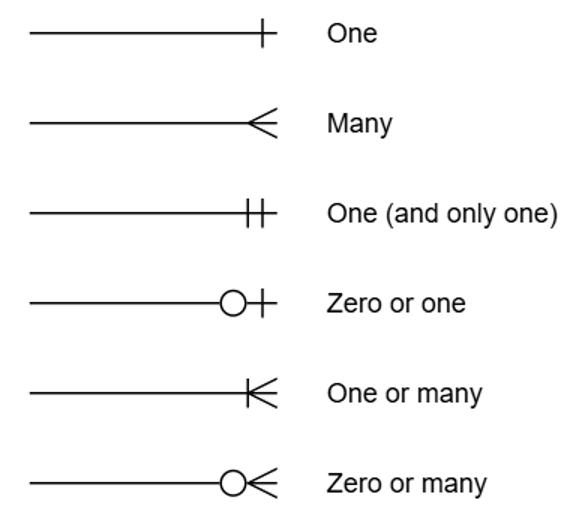
- Crow’s foot notation has been added, allowing more expressive visualization of relationship cardinalities.
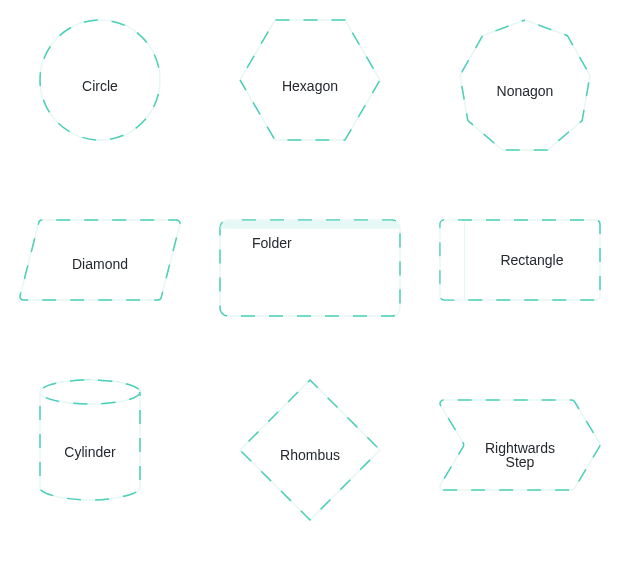
- Additional element shapes have been added. Elements can also be assigned custom background colors, making it easier to distinguish domains or groups of objects.
- A right-click menu on an element now allows you to open the object in another diagram type or open it in a new window, improving cross-diagram navigation.
Improved Search
Adding objects to diagrams is now more straightforward. You can search across all objects within a selected space–app and use the search field to look up objects by name. This is especially useful when working with large datasets containing thousands of objects.
Once found, objects can be added to the diagram simply by dragging and dropping them from the hierarchy.
Open Object in Other Views
Right-clicking an object in a new conceptual model provides quick access to related views. From the context menu, you can:
- Open its conceptual model in a preview panel
- Open the object in other available diagram types
- Open the object page in a new window
This makes it easier to switch between conceptual, logical, and detailed views without losing context.
Relations Modification
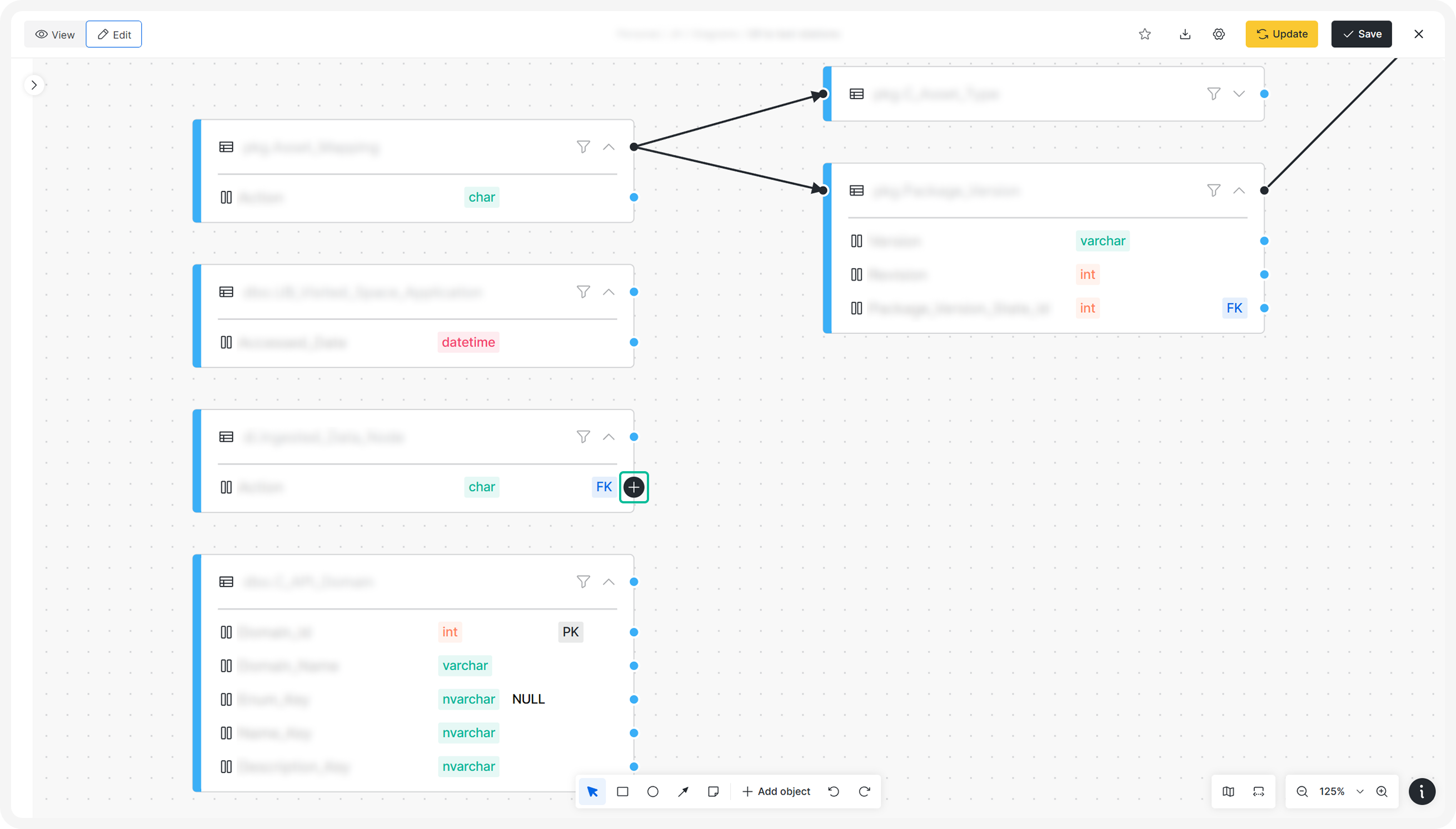
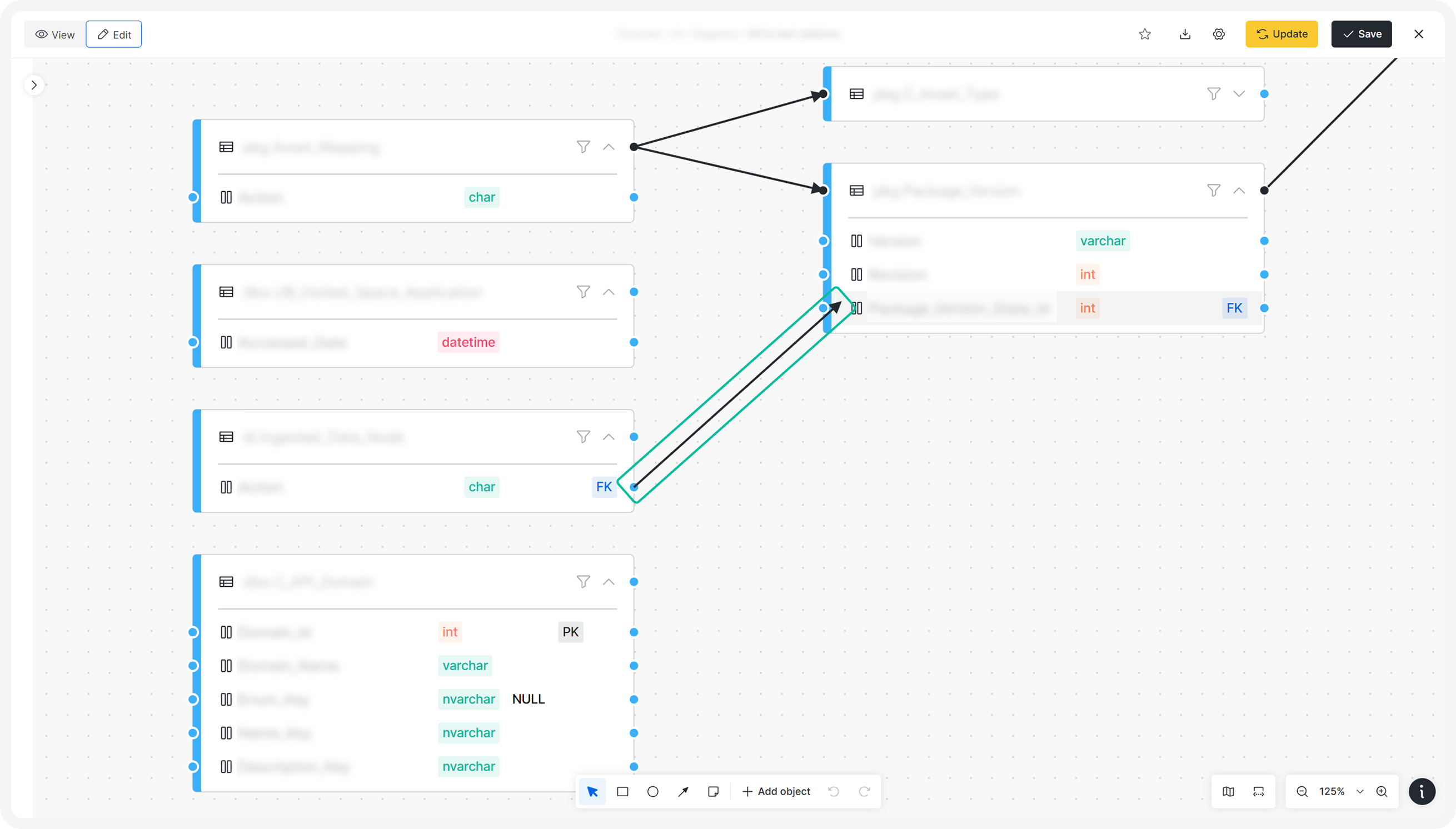
The modelling diagram has been improved to make managing relationships more intuitive. You can now create or adjust relations by dragging a relation line from one object to another either directly between elements or by holding and dragging an arrow onto the target element.
Other
Folders in modeling diagrams have also been refined:
- When a folder is resized or moved to fully cover another element, a parent–child relation is automatically created between them.
- You can move an element from one folder to another in the diagram to change its parent, keeping structural relationships aligned with the visual layout.
Diagrams
Entity Relations Diagram
The entity relations diagram now supports adding and modifying relations directly within the diagram view. This makes it easier to keep your data model up to date without switching between multiple interfaces.
Knowledge Diagrams
Knowledge diagrams have been optimized for better performance and improved readability. When you apply filters, the central node now remains visible so the diagram continues to provide meaningful context.
It is also possible to change which node is treated as the central node, giving you more control over the focus of the diagram and how related objects are displayed.
New Standard Applications
Azure Data Factory
The Azure Data Factory metadata scanner allows you to ingest metadata from pipelines, datasets, and linked services into Dawiso. This makes it easier to automatically generate documentation and enrich your business glossary with relevant technical and business context derived directly from your integration layer.
Logical Model
A new Logical Model application has been introduced to help users visualize business knowledge through conceptual diagrams.
With this application, you can:
- Create and edit relationships between entities directly in the diagram.
- Automatically create entities in Dawiso when they are added to the diagram and then define their metadata.
- Include objects from different spaces and applications in a single model to reflect cross-domain relationships.
Diagram behavior and appearance may vary slightly across applications. For more details, see Modeling Diagrams.
Microsoft Fabric
A new Microsoft Fabric application is now available for scanning Microsoft Fabric objects. This allows you to bring Fabric metadata into Dawiso and document it alongside your other data platforms.
Report Catalog
The Report Catalog provides a centralized overview of reports across your Dawiso environment. It enables users to locate, access, and work with reports without relying on departmental silos or personal storage. By consolidating reports into a single searchable catalog, it helps ensure that approved and reliable reports remain consistently available to everyone who needs them.
Packages
Multiple Global Fonts
Packages can now define multiple global fonts by separating them with a semicolon (;). The first font in the list becomes the default, and additional fonts are made available for selection in text editors. These fonts are preserved when using the copy_paste_as_plaintext_like option.
Static Text Component
A new Static Text component has been added to dashboards. It allows you to include non-editable descriptions, notes, or other fixed content that should remain consistent for all users. The component is defined via packages and supports HTML text formatting.
Script Component
The new Script component replaces previous attribute-type configurations for rendering code. It automatically detects and highlights code snippets such as SQL, JSON, or JavaScript so that scanned or embedded code is displayed in a clear, readable format.
Read-Only Relation Types
The isReadOnly property can now be applied to object type relations. This property is useful for relations that should not be manually edited, for example, codetable labels inherited from a parent object.
Pre-Set Filters for API Tables
API tables with external data sources can now include pre-configured default filters. These filters can also be made selectable from a dropdown list.
For example, for Column 1 with values A, B, C, and D, you can configure the table to offer only values A and B as filters.
Other
Hide Empty Sections in Export
Word export templates can now conditionally hide components when their data sources are empty. This makes exported documents cleaner and avoids unnecessary blank sections.
Example:
<<{"type":"text","Text":"Paragraph 1","style":"block","conditions":[{"type":"attribute","value":"packageKey_attributeTypeKey","operator":"not null"}]}>>Platform Improvements
In this version, we improved several of our core functionalities to make your experience with the platform smoother.
Exports
The export feature has been extended with the following capabilities:
- Automated exports compilation: Objects can be compiled into a single export when they reach e.g., the Done workflow state. In this setup, PDFA receives a JSON payload containing object descriptions and, once processing is complete, the resulting PDF is downloaded automatically.
- Exporting multiple objects: A Put all files in one folder option has been added to organize all exported files into a single directory, simplifying file handling after the export completes.
- Replace embeds with links: If an embedded object includes a URL in one of its attributes, the embed can replaced by a hyperlink to that URL for Word and PDF exports.
For more information, see Object export (Excel, Word, PDF).
Index Refresh
When you install a new package via Marketplace, the system now triggers an index refresh automatically where required, ensuring new structures are reflected without additional manual steps.
Microsoft Entra ID User Attributes
It is now possible to add additional attributes for users managed via Microsoft Entra ID. This allows for more complete user profiles and better alignment with identity data maintained in your directory.
Optionally, you can enable an optimized search mode, where search results are displayed and prioritized based on the user’s attributes (provided through Microsoft Entra ID) resulting in a more tailored search experience.
Search
Search Index
When installing packages that introduce new search indexes, Dawiso now automatically triggers an index refresh so that all changes are immediately reflected in search results.
Search Results
Search results now display richer contextual information to improve navigation at a glance:
- The application name and object type are included in the breadcrumb.
- The workflow state is visible directly on each search result tile.
These additions help users quickly understand where an object belongs and what stage it is in before opening it.
Text editor
The text editor has been extended with several new capabilities:
- Any diagram object, including conceptual diagrams, can be embedded directly into text content.
- Images and files can be added via drag-and-drop from your local folders or copy paste an image from browser into the editor.
- Additional bullet styles are supported (for example, alphabetic lists such as a, b, c).
- Indentation can be adjusted using Tab and Shift + Tab for more precise formatting.
These enhancements make it easier to create structured, visually rich documentation without leaving the platform. For more information, see the WYSIWYG HTML Editor documentation.
Tours
To support onboarding, platform tours can now be configured to start automatically for new users. This helps first-time users become familiar with key features and navigation patterns from the moment they log in.
UX/UI Enhancements
This release introduces several interface updates that make working with attachments, navigation, and images more convenient and readable.
Edit Attachment Names
It is now possible to rename attachments directly in their details view. Previously, only the description could be edited.
Newly, a 200-character limit is also enforced for attachment names to keep attachment lists clear and manageable.
Hide Object Count in Hierarchy
The option to hide the total number of objects in the left-hand hierarchy has been added in this release. This option helps reduce visual noise in larger implementations and provides a cleaner navigation experience.
Image Zoom
Images added to attributes are no longer static. You can open images in full screen and zoom in to inspect details more closely, which is particularly useful when working with diagrams, screenshots, or other visual documentation.