April, 2025
This month, we bring you the Dawiso 2025.3 release! 🚀 This release introduces major new capabilities to Dawiso, most notably the launch of Automations, enabling admin users to streamline repetitive tasks.
This release also brings a range of platform-wide optimizations, UI enhancements, and usability improvements. We’ve also addressed several important bugs to ensure a smoother and more reliable experience.
Explore the full overview below for a detailed look at everything that’s new and improved in 2025.3.
New Features
Automations
We’re excited to introduce the addition of automations to Dawiso. Thanks to this feature, admin users can configure and set up automation rules, including:
- How often the automation should run or what events trigger it,
- What objects will be subject to the rule,
- And what is modified or who is notified as the result of the automation.
Some examples of automation include:
- When the description of a Document object type is changed, the workflow state is set to Review.
- Any changes made in space A will send a notification to its Steward.
- When a user is assigned to an object, they will receive an email with the details.
In the graph below, you can see how the automation works. The standout functionality is that there can be multiple streams which will properly filter out your data, and multiple actions affecting the same dataset.

As automations are a powerful tool, the setup must be done with caution. While it can make a lot of tasks easier, improper setup might lead to irreversible changes to unintended objects.
To set up your automation, refer to our developer documentation on Automation Rules.
Data Ingestion
Lineage Parsing
Under Data Ingestion, you will now find a new section called Data flow parsing, where you can view detailed information about your parsing jobs. By default, lineage parsing is enabled for new data sources unless configured otherwise during setup.
In lineage diagrams, this information is visualized by indicators showing where scripts have been used. Clicking a script icon opens a window with details. If multiple scripts are present, you can choose which one to view from a selectable list.
Restart Ingestion
On the Data Sources page, a new action called Restart ingestion has been added. The difference between restarting and retrying an ingestion is the following:
- Restart ingestion: The ingestion was not successful and needs to be reinitiated from the beginning.
- Retry ingestion: The most recent ingestion attempt failed and should be retried using the same configuration.
Platform Enhancements and Optimizations
Diagrams: Self-Targeting Levels
The performance of diagrams has been greatly optimized thanks to the addition of self-targeting object levels. This means that objects nested in the same object type will be visualized. On the example, you can see an example Tableau hierarchy with all its folders and subfolders.
Entity Relations Diagram
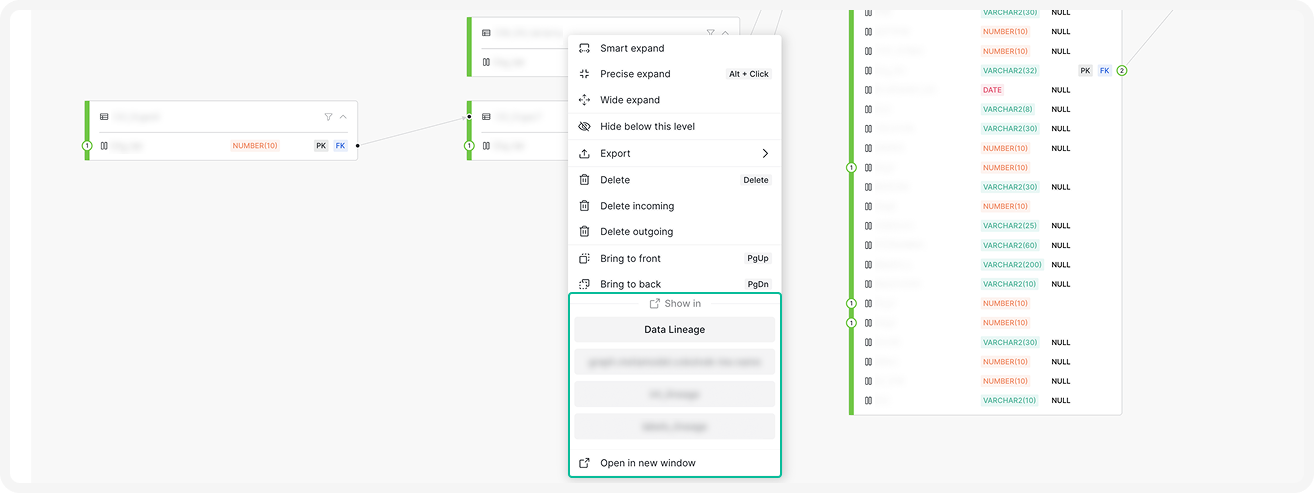
We further enhanced flexibility of entity relation diagrams thanks to the Precise expand action. You can also press ALT + click the number of incoming or outgoing flows to select which objects you want to add to the diagram. Until now, only double-click for full expand of the diagram was available.
Additional Right-Click Menu Changes
- Options to switch diagram types has been redesigned for clarity. When available, use this feature switch between diagram types without having to close the diagram, switching tabs, and opening it again.
- Tooltip hinting that precise expand can also be done using the ALT + Click keyboard shortcut instead has been added.
- Action icons have been redesigned to be more descriptive.
Improved Dawiso UI
A better and smoother UI which is more compact and allows the user to have a better overview of their spaces, objects, and dashboards at the first glance. For example, object tables will have better proportions, allowing more information to be displayed.
Settings Page: Administrative Tasks
On the Administrative tasks page, there are now more details on the issues with your environment in the Template refresh problems section. Here, you will find the information on the severity of the issue, the issue description, and what package is affected.
From this update, the sync marketplace option will be available only for environments where it’s enabled.
New Packages Configurations
Component IDs
In order to improve working with patch packages, component IDs are gradually added to all core packages.
New additions
- New harmonized attributes have been added for consistency across applications. For more information, see attribute types.
- New display levels for metamodels.
Bug Fixes
Anchors
Anchors on object pages have been fixed as they would previously disappear when scrolling. They now remain fixed at the top of the page while scrolling.
Diagrams
- Concepts in Diagrams: A bug which caused for concepts to show up in lineages has been addressed and will now be omitted from diagrams.
- Parent Calculations: An issue causing relations between parents to not visualize despite their child object having relations has been fixed. You can see this on the screenshot under Self-Targeting Levels.
Object Hierarchy
An issue causing the default object hierarchy to not show what object was currently open has been fixed. This happened when multiple hierarchies were available to select from.
Synonyms
An error preventing users from selecting the Synonym object type during child object creation from a panel has been fixed.