August, 2025
The Dawiso 2025.6 release is here! 🚀
This update brings a strong mix of new integrations, smarter modeling, and usability upgrades across the platform.
Highlights include support for MCP (Model Context Protocol) to connect Dawiso with AI and LLM tools, expanded automation with new triggers and actions, and improvements to conceptual modeling.
Read on for the full breakdown of what’s new in 2025.6!
Conceptual Modeling
We have introduced several new additions to conceptual models to better respond to the diverse needs of our users. These features are available for early adopters.
See the new functionalities below.
Crow’s Foot Notation
We continuously work on improving our conceptional models which is why they now newly support:
- More relation type visualization thanks to the addition of crow’s foot notation.
- Elements can have custom background colors.
Right-click menu on an element now allows you to open the object in a different diagram type or open it in a new window.
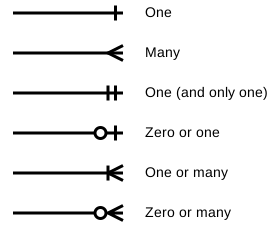
Relations
The entity relations diagram has been improved. You can now create or adjust relations by simply dragging a relation line from one object to another, either by dragging between elements directly or by holding and dragging an arrow onto the target element.
Improved Search
Adding objects to diagrams is now more simple. You can search across all objects within a selected space–app in the hierarchy and use the new search field to look up an object by name. This is especially useful when working with large datasets containing thousands of objects.
Then, simply drag and drop the object from the hierarchy to the diagram to add it.
Open Object in Other Views
Right-clicking an object in a new conceptual model allows you to open the object:
- Its conceptual model in a preview panel
- In other diagrams when available
- The object page in a new window
MCP Support
We are excited to announce that Dawiso now supports connections to AI and LLM tools via the Model Context Protocol (MCP) for early adopters. MCP is an open standard designed to enable context exchange between applications, making it easier to integrate Dawiso into broader AI-driven workflows.
With this connection, organizations can:
- Bulk create objects in Dawiso for faster setup and onboarding.
- Automate workflow updates, such as mass transitions or status changes.
- Provide MCP-based tools with access to Dawiso data, enabling them to generate answers and insights grounded in your company’s internal information.
- …and much more.
This integration expands how Dawiso can be used alongside modern AI tools, combining governance and automation with the power of contextualized intelligence.
More details regarding pricing and availability will be announced soon.
Packages
Automation
Automation rules now support more triggers and actions.
Triggers
New automation triggers include:
- Object renamed
- Concept published
- Object copied/cloned
Actions
A new action has also been added: Call Data Factory calls a pipeline with the trigger value passed in the JSON payload. This action is available to enterprise clients and is primarily intended for Dawiso and our implementation partners.
Read-Only Relation Types
A new isReadOnly property has been added to object type relations, allowing you to mark specific relations as non-editable. This is useful when values, such as codetable labels, are inherited from a parent and should not be changed manually.
For more information, see Object Type Relations.
Pre-Set Filters for API Tables
You can now configure default filters for API tables with an external data source and make them selectable from a dropdown list.
For example, if Column 1 contains values A, B, C, and D, you can pre-set the table to display only A and B by default.
Static Text Component
A new static text component has been added to dashboards. It allows you to include non-editable content such as descriptions or notes, ensuring consistent text for all users. The component is defined in packages and supports HTML text formatting. formatting.
UX/UI Enhancements
Image Zoom
Our customers told us they wanted more flexibility when working with images and we listened. Images added to attributes are no longer static as you can now open them in full screen and zoom in for better detail.
Platform Improvements
Index Refresh
When you install a new package via Marketplace, the index refresh is now executed automatically when required.
Search
Search results now display more contextual information to improve navigation at a glance:
- Application name and object type were added to the the breadcrumb.
- Workflow state is now visible on the search result tile.