Dawiso Integration Runtime (DIR) is the on-premises alternative for cloud-level scanning of metadata into Dawiso.
DIR is suitable in the following scenarios:
- Your metadata source (i.e. database engine, API, etc.) is in your infrastructure behind a firewall and access to it cannot be opened for the public internet.
- You cannot share access credentials to your metadata sources with Dawiso because of security policies or any other concerns. See Connection types for more details.
- To optimize performance, a large number of metadata assets should be scanned locally first instead of scanning it from a Dawiso cloud instance.
Use DIR to:
Understanding the DIR workflow
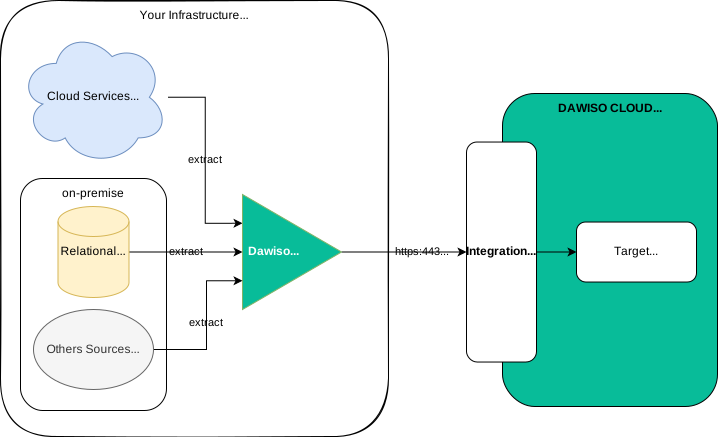
- DIRruns in your infrastructure and connects to your cloud or on-premise data sources with the connection properties and credentials.
- Properties and credentials were specified in the DIR configuration JSON.
- Metadatais ingested from the source into JSON files. Files are stored in a local path and compressed with a standard gzip algorithm.
- You can review the content and see what exactly was extracted from the metadata source and it will be sent to Dawiso if needed.
- Once metadata extraction is completed, all gzipped files will be sent to your Dawiso cloud instance Integration API using standard HTTPS protocol (port 443).
- Dawiso will process incoming files and import metadata in the target Space & Application metadata repository.
Requirements to run DIR
To successfully run Dawiso Integration Runtime (DIR), your environment must meet several system and network requirements. These ensure reliable metadata ingestion and smooth performance during scanning operations. The following sections outline the necessary prerequisites for installation and execution of DIR.
1. .NET 10 Runtime
DIR is a .NET 10 application. It can be run on both Windows and Linux systems, provided that the .NET 10 runtime is installed.
2. Hardware Requirements
The following hardware sizing is recommended based on the size of your metadata environment:
| Standard environments | Large environments |
|---|---|
| 2 vCPUs, 4 GB RAM Sufficient for most common metadata scanning scenarios. | 4 vCPUs, 8 GB RAM For datasets exceeding 5 million metadata assets, higher hardware specifications are recommended to ensure better performance and processing capacity. |
3. Local Storage
DIR requires local storage to temporarily store metadata extraction files.
- Typical usage: A few gigabytes of space are sufficient.
- For large environments or longer retention periods: Provision up to 500 GB of storage to ensure stability and future scalability.
4. Network Access
DIR must be able to access the following network endpoints:
- Metadata sources:
- A direct network connection to each metadata source is required.
- Authentication methods and supported connection types vary per source (see individual connector documentation).
- Dawiso Cloud: An HTTPS (port 443) connection is required to communicate with the Dawiso Cloud Integration API.
Download DIR to your local device
Download DIR from this link. Select DIR version based on your machine.
| DIR file | When to use |
|---|---|
integration-runtime-linux.zip | For use on Linux systems. |
integration-runtime-windows.zip | Select this version if you have .NET 10.0 on your local machine. If necessary, you might receive a prompt with links and instructions on how to download .NET. |
integration-runtime-windows-self-contained.zip | Select this all-included version if you do not have admin permissions to install .NET on your local machine. |
Upgrade DIR
Upgrading DIR is necessary when changes have been made to ingestion that affect your environment, for example, if updates were made to the connectors you are using or if new connectors were developed that you want to take advantage of.
To upgrade DIR, follow these steps:
- Download the newest version of DIR from one of the links above.
- In the existing DIR folder, make sure the following are preserved:
WorkingFolder- All
DawisoIntegrationRuntimefiles (= DIR configuration files)
- Delete all other DIR files.
- Extract DIR to the original folder with the
WorkingFolderand DIR configuration files.
The WorkingFolder contains all delta files. If it is deleted during an upgrade, the delta files will be lost, forcing a full load delta to be generated, causing DIR and the upgrade to fail.
Ingest data using DIR
For step-by-step guides on how to ingest data using DIR, see: