The Microsoft Entra application allows you to ingest all relevant object from your Microsoft Entra in Azure and visualize relations like group membership etc. It is also used to connect security assets from other applications (like owners of Power BI Workspaces) together.
Default hierarchy
In the chart below, you will find the organizational structure of Microsoft Entra objects. Objects are represented in green and folders are in yellow.
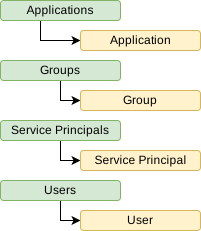
Object types
Dawiso ingests the following objects from the Microsoft Entra:
Group
Maps to Group object type.
| Source Attribute | Target Attribute in Dawiso |
|---|---|
| name | Name |
| created_date | Created |
| id | ID |
Microsoft Application
Maps to Microsoft Application object type.
| Source Attribute | Target Attribute in Dawiso |
|---|---|
| name | Name |
| created_date | Created |
| id | ID |
Service Principal
Maps to Service Principal object type.
| Source Attribute | Target Attribute in Dawiso |
|---|---|
| name | Name |
| application_id | Application Id |
| id | ID |
User
Maps to User object type.
| Source Attribute | Target Attribute in Dawiso |
|---|---|
| name | Name |
| business_phone | Business Phone |
| given_name | Given Name |
| id | ID |
| job_title | Job Title |
| office_location | Office Location |
| surname | Surname |
| user_principal_name | User Principal Name |