Relations connect objects and elements in a modeling diagram.
Add a relation
Relations between elements can be added in two ways, directly in the diagram, or using the action panel.
Connection handles
- Select an element. Each element has connection handles displayed on the top, bottom, left, and right sides of the element. When you hover on them, they turn into icons.
- Click and hold a handle.
- Drag the line to another element.
- Release to create a relation between the two elements.
Action panel
- In the action panel at the bottom of the diagram, select the line icon, or click the arrow next to it to select a different relation type.
- Click and hold the source element.
- Drag the line to the target element.
- Release to create a relation between the two elements.
Edit relations
Clicking a created relation displays a menu for editing it.
| Action | Description |
|---|---|
 Change color Change color | Click the circle button to change the color of the line. |
T Add text | Click the text button to add text label to the line. |
 Change relation type Change relation type | Select relation type for your relation. Currently, the following types are available: 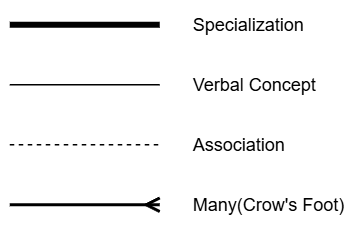 |
 Choose relation style Choose relation style | Select line type: rounded or sharp edges. Not available for the Many relation type. |
| Line start | Choose whether the line should display an arrow at the start. Many (crow’s foot) relation type has the following line notations available: 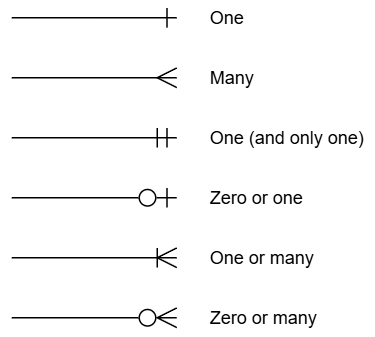 |
 Swap Swap | Click the swap icon to switch the line start and line end. |
| Line end | Same options as for the line start, but applied to the line end. |
| Delete | Click the trash can icon to delete the relation. |
Tip
The path of relation lines can also be adjusted. Clicking a relation line in a diagram displays manipulation handles:
 Thick line handles: Move sections of the line up, down, left, or right.
 Circular end handles: Mark the points where the line changes direction. Drag them to adjust the angle or move the bend to a new position.